nuxt项目使用sharp库和github actions在linux环境下打包导致的错误
环境
nuxt全栈开发. 用的了trpc和nuxtui. 本机环境是windows11, 使用github actions打包.
使用sharp库进行了图片处理
jobs:
  build-push:
    environment: prod
    runs-on: ubuntu-latest
问题
打包环境是ubuntu-latest, 打包过程没有问题, 打包后的产物在win下启动不报错,但是点击登陆按钮, 首页报错如下:
报错原因是在linux下打包的代码, 在win下运行缺少sharp包的的相关文件
Listening on http://[::]:3000
[Vue Router warn]: No match found for location with path "/_nuxt/"
[Vue Router warn]: No match found for location with path "/_nuxt/"
[Vue Router warn]: No match found for location with path "/_nuxt/"
[Vue Router warn]: No match found for location with path "/_nuxt/"
[Icon] loading icon `lucide:chevron-down` timed out after 1500ms
[request error] [unhandled] [POST] http://localhost:3000/api/trpc/system.login?batch=1
 H3Error: Could not load the "sharp" module using the win32-x64 runtime
Possible solutions:
- Ensure optional dependencies can be installed:
    npm install --include=optional sharp
- Ensure your package manager supports multi-platform installation:
    See https://sharp.pixelplumbing.com/install#cross-platform
- Add platform-specific dependencies:
    npm install --os=win32 --cpu=x64 sharp
- Consult the installation documentation:
    See https://sharp.pixelplumbing.com/install
    at Object.<anonymous> (C:\Users\16864\Downloads\测试\019b3bba-90e1-7378-a5be-2a20e0d17022\server\node_modules\sharp\lib\sharp.js:121:9)
    ... 8 lines matching cause stack trace ...
    at Module._extensions..js (node:internal/modules/cjs/loader:1613:10) {
  cause: Error: Could not load the "sharp" module using the win32-x64 runtime
  Possible solutions:
  - Ensure optional dependencies can be installed:
      npm install --include=optional sharp
  - Ensure your package manager supports multi-platform installation:
      See https://sharp.pixelplumbing.com/install#cross-platform
  - Add platform-specific dependencies:
      npm install --os=win32 --cpu=x64 sharp
  - Consult the installation documentation:
      See https://sharp.pixelplumbing.com/install
      at Object.<anonymous> (C:\Users\16864\Downloads\测试\019b3bba-90e1-7378-a5be-2a20e0d17022\server\node_modules\sharp\lib\sharp.js:121:9)
      at Module._compile (node:internal/modules/cjs/loader:1529:14)
      at Module._extensions..js (node:internal/modules/cjs/loader:1613:10)
      at Module.load (node:internal/modules/cjs/loader:1275:32)
      at Module._load (node:internal/modules/cjs/loader:1096:12)
      at Module.require (node:internal/modules/cjs/loader:1298:19)
      at require (node:internal/modules/helpers:182:18)
      at Object.<anonymous> (C:\Users\16864\Downloads\测试\019b3bba-90e1-7378-a5be-2a20e0d17022\server\node_modules\sharp\lib\constructor.js:10:1)
      at Module._compile (node:internal/modules/cjs/loader:1529:14)
      at Module._extensions..js (node:internal/modules/cjs/loader:1613:10),
  statusCode: 500,
  fatal: false,
  unhandled: true,
  statusMessage: undefined,
  data: undefined
}
[unhandledRejection] Error: Could not load the "sharp" module using the win32-x64 runtime
Possible solutions:
- Ensure optional dependencies can be installed:
    npm install --include=optional sharp
- Ensure your package manager supports multi-platform installation:
    See https://sharp.pixelplumbing.com/install#cross-platform
- Add platform-specific dependencies:
    npm install --os=win32 --cpu=x64 sharp
- Consult the installation documentation:
    See https://sharp.pixelplumbing.com/install
    at Object.<anonymous> (C:\Users\16864\Downloads\测试\019b3bba-90e1-7378-a5be-2a20e0d17022\server\node_modules\sharp\lib\sharp.js:121:9)
    at Module._compile (node:internal/modules/cjs/loader:1529:14)
    at Module._extensions..js (node:internal/modules/cjs/loader:1613:10)
    at Module.load (node:internal/modules/cjs/loader:1275:32)
    at Module._load (node:internal/modules/cjs/loader:1096:12)
    at Module.require (node:internal/modules/cjs/loader:1298:19)
    at require (node:internal/modules/helpers:182:18)
    at Object.<anonymous> (C:\Users\16864\Downloads\测试\019b3bba-90e1-7378-a5be-2a20e0d17022\server\node_modules\sharp\lib\constructor.js:10:1)
    at Module._compile (node:internal/modules/cjs/loader:1529:14)
    at Module._extensions..js (node:internal/modules/cjs/loader:1613:10)
解决
1. 用windows打包
把action换成windows部署:
runs-on: ubuntu-latest -> runs-on: windows-latest
但是nuxt项目在win下打包很慢, 参考:github issue. 我个人感觉的原因是添加了iconify相关的依赖导致的.
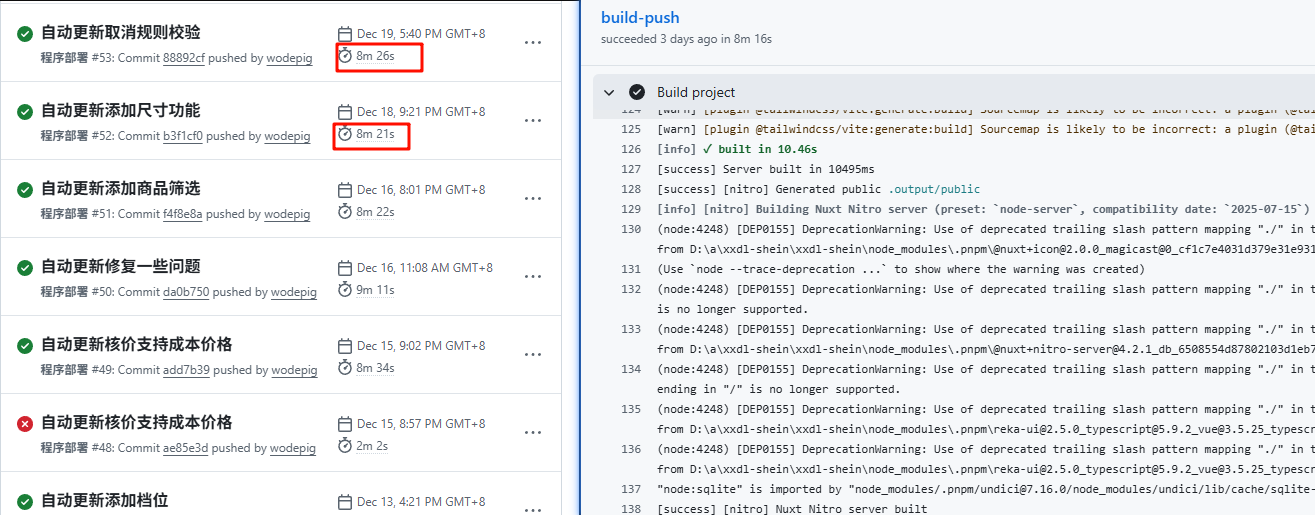
每次打包都需要8分钟. 主要是在build阶段有警告.
(node:29588) [DEP0155] DeprecationWarning: Use of deprecated trailing slash pattern mapping "./" in the "exports" field module resolution of the package
at E:\wsProject\xxdl-shein\node_modules\@vueuse\core\package.json imported from E:\wsProject\xxdl-shein\node_modules\.cache\nuxt\.nuxt\dist\server\server.mjs.
Mapping specifiers ending in "/" is no longer supported.
2. 用npm/pnpm进行多平台构建
https://sharp.pixelplumbing.com/install/#cross-platform
按照报错说明, 使用npm install --os=win32 --cpu=x64 sharp命令在linux中安装win下的sharp模块
记得把之前pnpm相关的命令都换成了npm. 测试后发现可以成功.
由于我一直都是用pnpm, 所以根据官网说明, 把npm命令换成pnpm的:
npm install --os=win32 --cpu=x64 sharp
换成:
pnpm install --os=win32 --cpu=x64 sharp
需要注意, pnpm --os和--cpu参数需要pnpm版本大于v10.14.0官方说明, 对于action中的pnpm ,需要用pnpm self-update进行更新才能安装成功
同时在linux下, sharp包安装后会增加30MB左右, 对于win下运行这些数据是多余的,删掉即可
// actions
      - name: delete file
        shell: bash
        run: |
          rm -rf ./.output/server/node_modules/@img/sharp-libvips-linuxmusl-x64
          rm -rf ./.output/server/node_modules/@img/sharp-libvips-linux-x64
          rm -rf ./.output/server/node_modules/@img/sharp-linuxmusl-x64
          rm -rf ./.output/server/node_modules/@img/sharp-linux-x64
最终actions
name: 程序部署

on:
  push:
    branches:
      - main

jobs:
  build-push:
    environment: prod
    runs-on: ubuntu-latest

    steps:
      - name: Checkout code
        uses: actions/checkout@v4

      - name: Set up Node.js
        uses: actions/setup-node@v4
        with:
          node-version: '20.19.4'
      - name: Install pnpm
        shell: pwsh
        run: npm install -g pnpm
      - name: Check pnpm
        shell: pwsh
        run: |
          pnpm -v
          pnpm self-update
          pnpm -v
      - name: Install sharp (win32-x64)
        shell: pwsh
        run: pnpm install --os=win32 --cpu=x64 sharp
      - name: Install dependencies
        shell: pwsh
        run: pnpm install --frozen-lockfile

      - name: Build project
        shell: pwsh
        run: pnpm build

      - name: delete file
        shell: bash
        run: |
          rm -rf ./.output/server/node_modules/@img/sharp-libvips-linuxmusl-x64
          rm -rf ./.output/server/node_modules/@img/sharp-libvips-linux-x64
          rm -rf ./.output/server/node_modules/@img/sharp-linuxmusl-x64
          rm -rf ./.output/server/node_modules/@img/sharp-linux-x64
其他
另外不要完全的依赖ai. 我问他npm install --os=win32 --cpu=x64 sharp是不是能够在linux中安装win下的sharp包, 他一口咬定必须在目标平台执行才有效. 事实上他就是胡说